WhoEvery user
WhereThe button — also the screen PsyTrace opens with
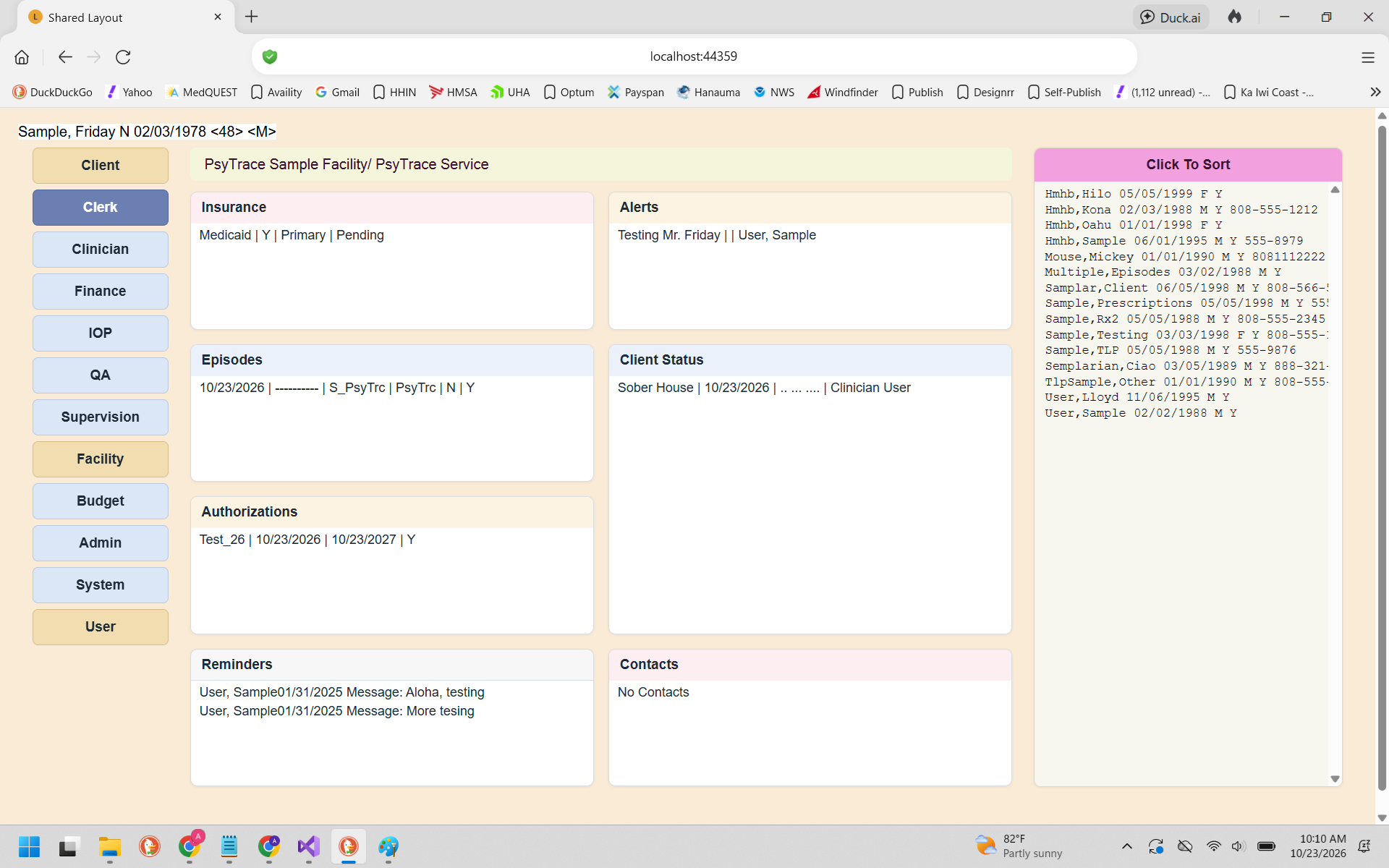 The Clerk screen. Click any line of a list to open that list's menu.
Two levels: the client, then the Episode
Some lists belong to the client and are filled as soon as you choose the client. The others belong to one Episode of Care: click the Episode in the Episodes list first, and they are filled for that Episode.
| List | Belongs to | Menu | Page |
|---|
| Insurance | Client | View / Edit / New Insurance | Insurance |
| Alerts | Client | View / Edit / New Alert | Alerts |
| Episodes | Client | View / Edit / New Episode | Episodes of Care |
| Authorizations | Episode | View / Edit / New Authorization | Authorizations |
| Client Status | Episode | View / Edit / New Status | Client Status |
| Contacts | Episode | View / Edit / New Contact | Contacts |
| Reminders | You | Refresh | Reminders |
Discharged Episode? When the Episode you clicked is discharged, it is locked: Edit Episode and the New / Edit items of Authorizations, Client Status and Contacts are dimmed. View still works. A new admission needs a .
The client's own record
The client's registration (name, birth date, address, contacts) is not a list on this screen: it is in the menu — , and . See New Client Registration.