WhoClinicians (trainees: reviewed by the Supervisor)
WhereClinician screen › Episodes list ›
After itThe Episode is locked
Why discharge
Outpatient clinicians are often not used to "discharging" a client: the record is left open even when treatment has ended or the client has stopped coming. But an open Episode states that the client is still under the organization's care — and its responsibility. Discharging after each Episode also keeps each period of care separate: the care for a substance problem in one Episode, the care for anxiety two years later in another.
The type of discharge is an outcome measure: "Treatment completed", "Client moved to another city", "Left before treatment was completed"... A high share of early leavers is information the organization can act on. The types are a lookup table (L_DischargeType, ).
Discharging a client
- Click the Episode in the Episodes list › .
- Discharge Date (today by default) and, if you wish, the Hour (e.g. 2:30 PM).
- Type of discharge and Discharged by (you, by default).
- The Discharge Summary (Import Note Text for a pre-defined text).
- Tick Make the client inactive if the client will not come back to any Service.
- Save.
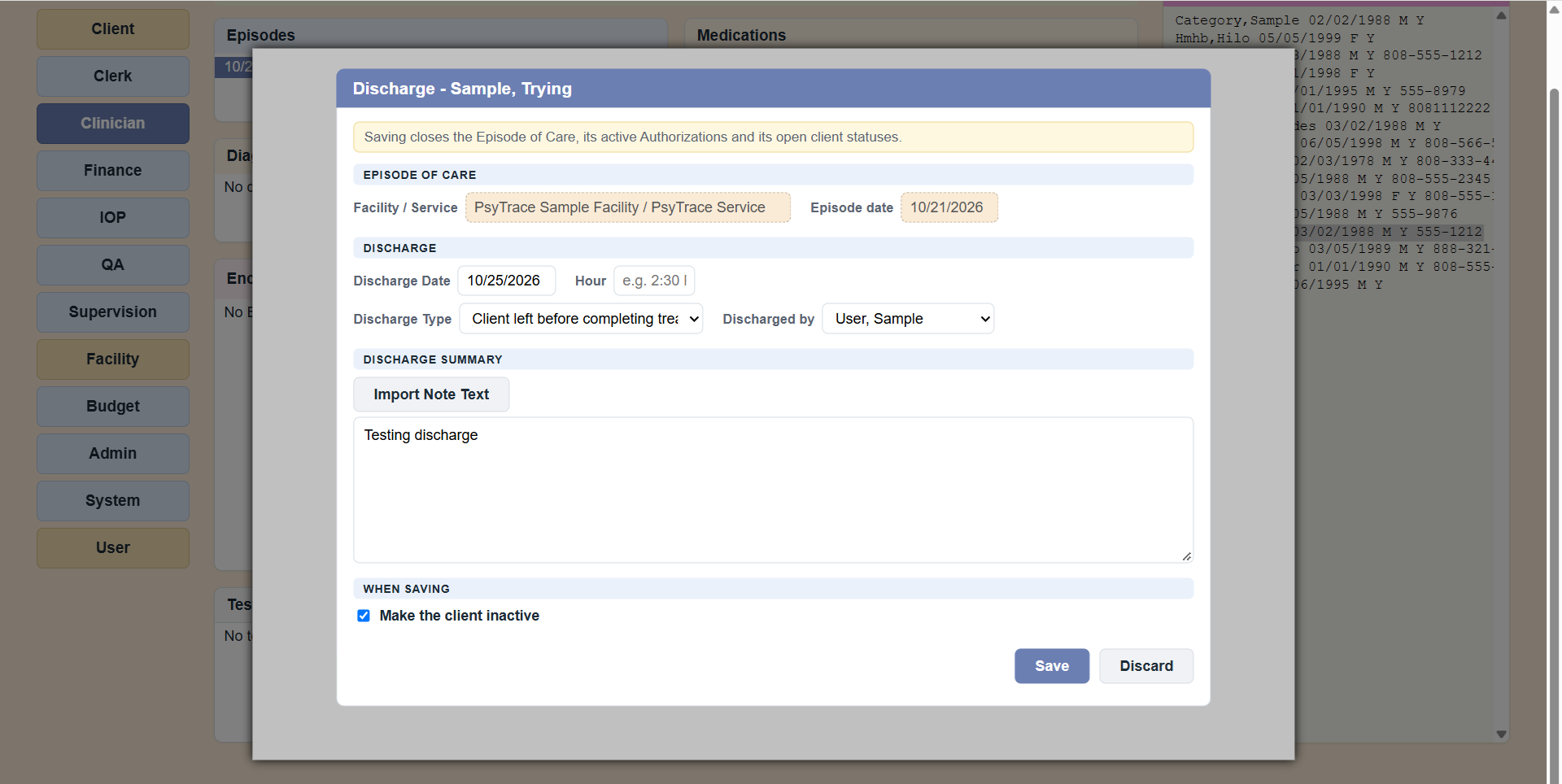 The Discharge form. The note on top reminds what Save will close.
What happens
- The Episode becomes inactive; its active authorizations end on the discharge date; its open client statuses end on the discharge date. All in one step, all in the audit trail.
- The Episode is locked: nothing can be added or changed in it (encounters, contacts, authorizations, statuses, medications...). View still works. A new admission = a on the Clerk screen.
Trainees and supervisors
When a trainee discharges a client, the Episode stays open and the discharge waits for the trainee's Supervisor (Supervision screen, Waiting for my review). The Supervisor opens it with Discharge › Enter/Edit, may write a Supervisor Addendum, and ticks Close the Episode of Care to complete the discharge.
PsyTrace checks
- Required: the Discharge Date and the Type.
- The date cannot be in the future, before the Episode started, or before its last encounter.
- A discharge can be corrected later by who discharged the client or by a System user (discharge fields only). A System user can also Undo Discharge: the Episode is active again (authorizations and statuses stay closed).
shows it read-only; gives a printable page.