WhoA solo practitioner or a small office doing its own billing
WhereAdmin, Clerk, Clinician and Finance screens
You needA blank red CMS-1500 form in your printer
1. Once: your practice
- : your practice name, Tax ID and address, as they should print on the claim.
- : check the carrier is there (with its mailing address — it prints on top of the claim); add it if not.
- On the Location, Pin Numbers: the carrier, the payee name as it should print (e.g. Antonio Gino, PhD) and the number the carrier gave you.
2. The client (Clerk screen)
- New client → Insurance (carrier, Primary, the member ID) → Episode of Care (first service date, marital status, employment) → Authorization (number, carrier, dates). PsyTrace opens each form after the one before.
- No authorization needed by the carrier? Use its short name as the number (e.g. BCBS).
3. Diagnosis and encounter (Clinician screen)
- Diagnoses: the Episode's diagnosis.
- New Encounter: date, procedure (CPT), units, authorization, location. It is filed as Not Billed.
4. The claim (Finance screen)
- Click the Episode, then the Invoices list › .
- The encounters not yet billed are listed in claim groups. Click Select on the group: up to 6 encounters are ticked, oldest first.
- Check Dx 1-4 and the claim boxes, then Save and Print. Print with Margins: None, Scale 100%.
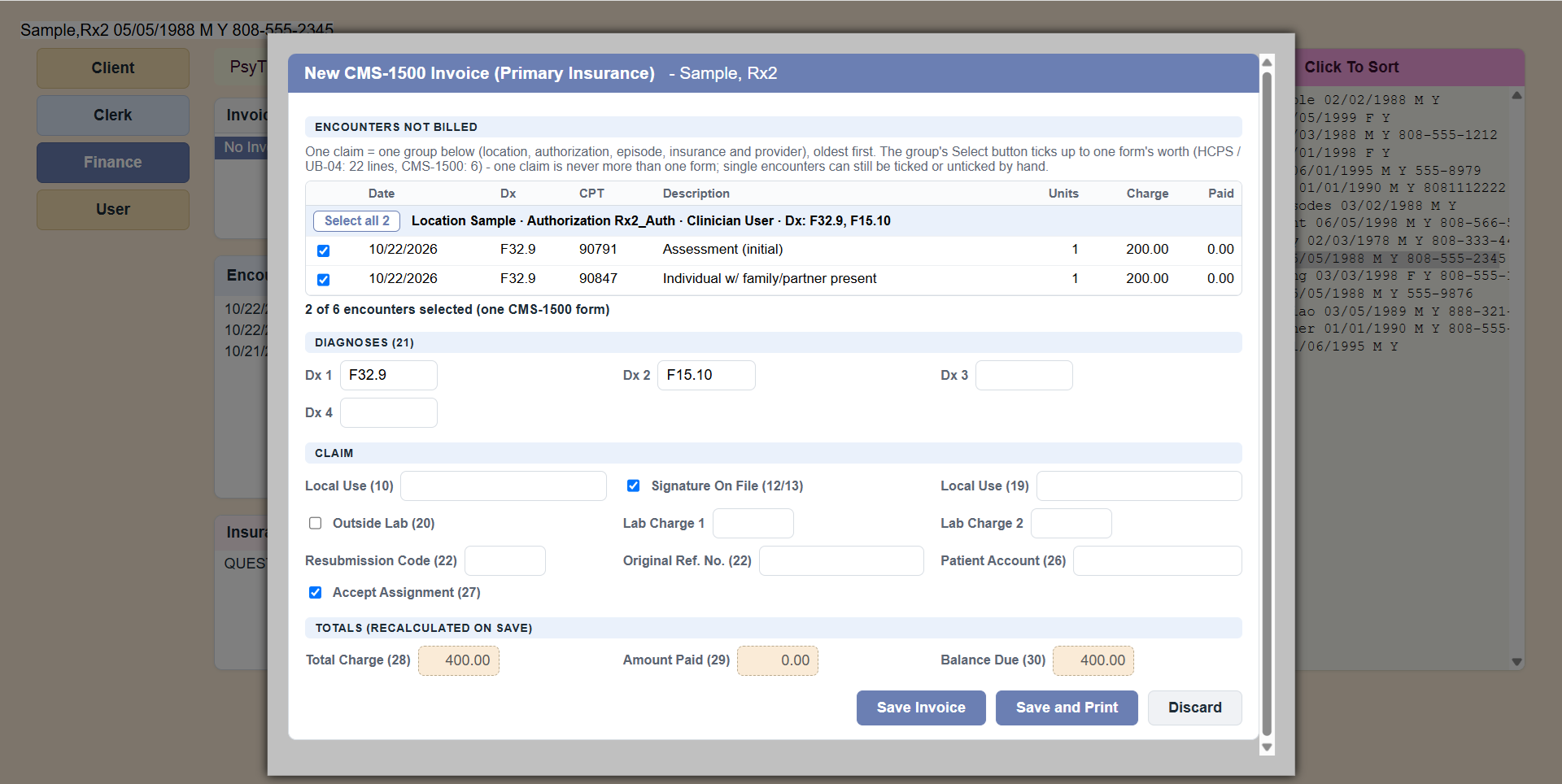 New CMS-1500: Select ticks the group's encounters; check Dx 1-4, then Save and Print.
5. The payment
- When the carrier pays: click the claim in the Invoices list › .
- Choose the line, the date, the amount, the check number; Paid or Partial; leave the invoice Open or Close it. Save Payment. See Payments.
Done! One whole cycle, from seeing the client to the claim and its payment, with no billing clerk needed.